AccountingLegalInsuranceHealthcareRecruiting
In your business, the conversation is the work.
The AI layer for teams
that work on the phone.
ActiveLens captures every call and meeting with no integration, answers from your own documents while you talk, turns what was said into tasks anyone in the company can own, and updates your CRM.
Free trial · No credit card
- Phone calls
- Softphones
- Desk phones
- Mobile phones
- Online meetings
- In-person meetings
No IT project, no phone system to replace, and no bot joining your meetings. Install it and it works on your next call.
See it work
This is what it looks like.
A call comes in on the dialer the team already uses. ActiveLens captures it, and the summary and follow-ups are waiting by the time you hang up.
See it work
From the first ring to finished work.
The caller is matched to your CRM as the phone rings. Call Intelligence and Ask Anything help while you talk. And the call's Active Board drafts the tasks, email, meeting and CRM update — waiting for your approval.


The call's start, the number and the VoIP provider are picked up on their own — no integration, with any softphone — and the caller is matched to your CRM.
Why phone calls were never captured.
It isn't that nobody tried. The phone is a harder problem than it looks.
Meeting tools only ever had to support three platforms. Phone calls run on hundreds of different systems — and unlike Zoom or Teams, almost none of them announce when a call starts, when it ends, or who is on the other end.
ActiveLens works that out on your own device instead of asking the phone system. Which is why it works on any dialer, from your first call.
How everyone else does it
An integration per platform — and on a phone line there is nothing for a bot to join, so there is no path in at all.
How ActiveLens does it
One capture point. No bot, and no integration on any softphone.
different business phone systems across the US and EU — which is exactly why nobody built for them
Source: US + EU market analysis, 2024–25.
Why ActiveLens exists
Built for businesses that run on the phone.
Most AI tools were built for companies that live on video calls. Yours doesn't.
Your day is not four back-to-back video calls. It is a client on the phone, a family asking about their mother, a candidate screen, someone who walks into the office, a meeting where the minutes have to be exact. Every tool on the market covers one of those and ignores the rest — so most of what your business says out loud is never captured at all.
ActiveLens was built the other way around: start from every conversation your business actually has, and cover all of it. One platform, one record, nothing falling between the cracks.
Every way your business talks
One platform across all of it — no separate tool per channel, and nothing left uncovered.
| Capability | Meeting-only tools | ActiveLens |
|---|---|---|
| Zoom, Teams, Meet | Yes | Yes |
| Softphone on your computer | Sometimes | Yes |
| Desk phone | No | Yes |
| Mobile call | No | Yes |
| In-person meeting | No | Yes |
| A bot joins the call | Yes | Only if you send one |
| Integration with your phone system | Required | None |
| Works on the phone system you already have | No | Yes |
Mobile calls are captured directly on the phone systems ActiveLens integrates with — Zoom Phone, RingCentral, Quo, Phone.com and more.
Your phone system's AI sees the calls on that phone system. ActiveLens captures calls on any dialer and desk phone — and keeps them in one record with your meetings.
Consolidated in one place, searchable, and turned into the follow-ups that come next — whichever of those a conversation happened on.
Your most important conversations leave no trace.
The call where the client finally agreed. The one where they explained what was actually wrong. Gone the moment you hang up.
You hang up and it's gone
Video meetings come with notes attached. Phone calls come with nothing — no transcript, no summary, just whatever you managed to write down while talking.
You promised three things. You remember two.
Commitments made on a call are only as reliable as the memory of the person who made them. The third one usually surfaces a week later, from the customer.
Your evening is spent writing up your day
Notes to type, CRM records to update, follow-up emails to send — all of it re-entering information the conversation already contained.
Meeting tools solved this for video calls. Nobody solved it for the phone.
From conversation to finished work.
Six things ActiveLens does, on every conversation your business has.
Capture
Any phone. Any meeting tool. Nothing to install on either.
ActiveLens records on the device, not inside the call. That one decision is why it works on every phone system: a softphone, a desk phone on speaker, a video meeting, or two people across a table. No bot joins, and nothing changes about how you dial.
- Mobile calls captured directly on the phone systems ActiveLens integrates with — Zoom Phone, RingCentral, Quo, Phone.com and more
- Already have a recording? Drag in an audio or video file and it goes through the same pipeline
- Merge up to ten related calls into one record when a matter ran across several conversations
- See the month on a calendar instead of a list, and open any day's calls from it
- A hearing recorded on a phone becomes a case file
Understand
A summary in your format, not a wall of transcript.
Participants, purpose, client context, what was discussed, what was agreed. The format is set by a template you control — length, tone, structure, and the rules the AI applies. Don't like this one? Say what to change, by typing or by voice, and it rewrites.
- A template per call type, so collections gets a different format from sales
- Output language set independently of the language spoken — calls in Hebrew, summaries in English for head office
- The full transcript, speaker-identified, with a line-by-line translation under each line
- Every product name and piece of jargon resolved as you read — from the web, and from your own documents

Tasks
Created from the call, not from memory.
ActiveLens proposes the tasks it heard. You keep the ones you want. Each carries an owner, a status, a priority, a due date and a link back to the call that created it, with overdue items in red.
- Assign work to anyone in the company, including people who only ever touch tasks — $4 per user per month
- The same tasks as a list, or as a board by status — to do, in progress, on hold, done
- Every call's proposed tasks land in one inbox: keep the ones you want, dismiss the rest
- Speak a note instead of typing one and it comes back as tasks, with the transcript as you record
- Change the status of many at once, and everyone affected gets one digest rather than ten emails
Northwind's CFO signs anything above €40,000 and has never met us — everything he hears about the value reaches him through Daniel.

Follow-ups
The email and the meeting, already drafted.
ActiveLens recognises what was promised and writes the email — subject, body, and the documents that were asked for, itemised. Choose the tone: friendly, formal or concise. Then open it in Gmail or Outlook and send it from your own account, so it stays in your thread and your history.
- A follow-up detected on the call comes back as real open slots from your calendar
- The title and agenda written from the conversation — what will be covered, the concerns raised, the paperwork needed
- Connect Google or Outlook, choose which calendars count, set your working hours; times are only proposed when you are genuinely free

CRM
The CRM, updated without data entry.
ActiveLens finds the right record, shows you how it matched it, then lays out every proposed change — old value struck through, new value beside it, editable before anything is written. The call summary is attached as a comment on the call log.
- Three corrections heard on a call, written to Salesforce in one click
- Nobody types anything, and nothing is written until you say so

Live
Help while you're still on the call.
On calls from your computer, ActiveLens works live. Terms, products and companies are resolved as they come up — from the web and from your own documents. Objections surface with an answer while you can still use it.
Live assistance works on calls made from your computer. Desk phone and mobile calls get the full after-call summary, tasks and CRM update.
- Know the term before it matters
- An answer to the objection, while you can still use it
- Then the usual work gets done

Everything the Active Board produces is a draft waiting for your approval. Nothing is sent, booked or written without you.
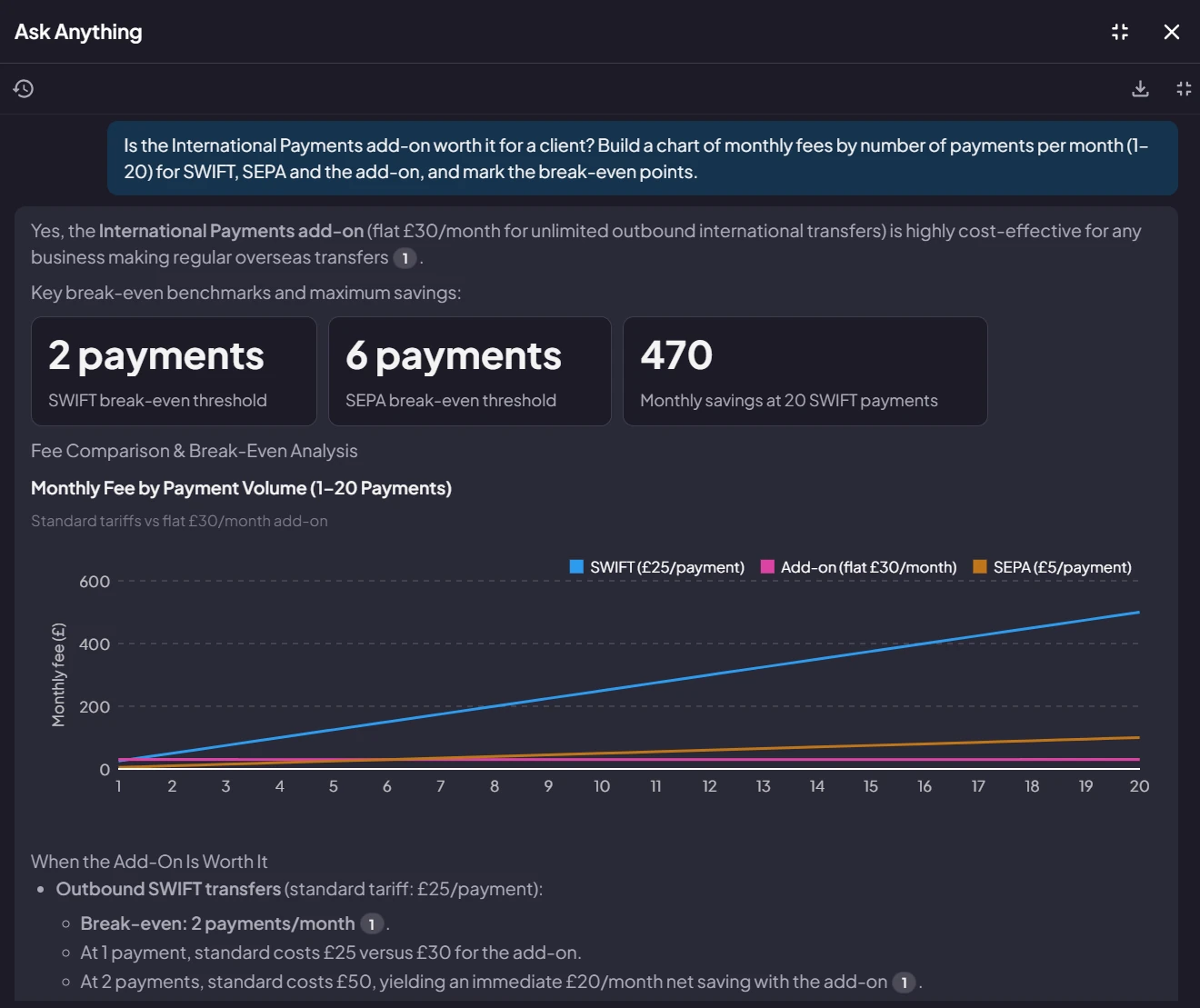
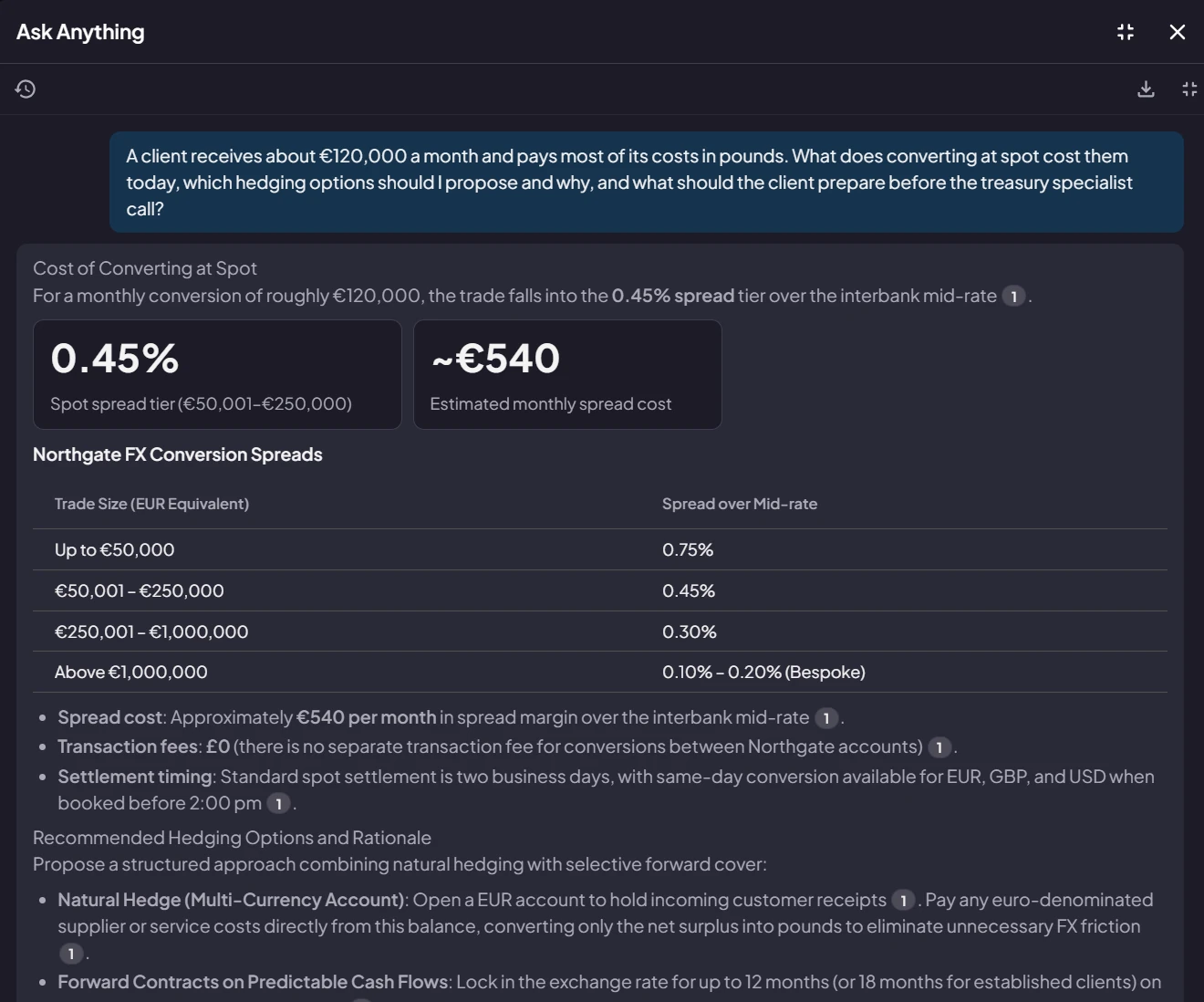
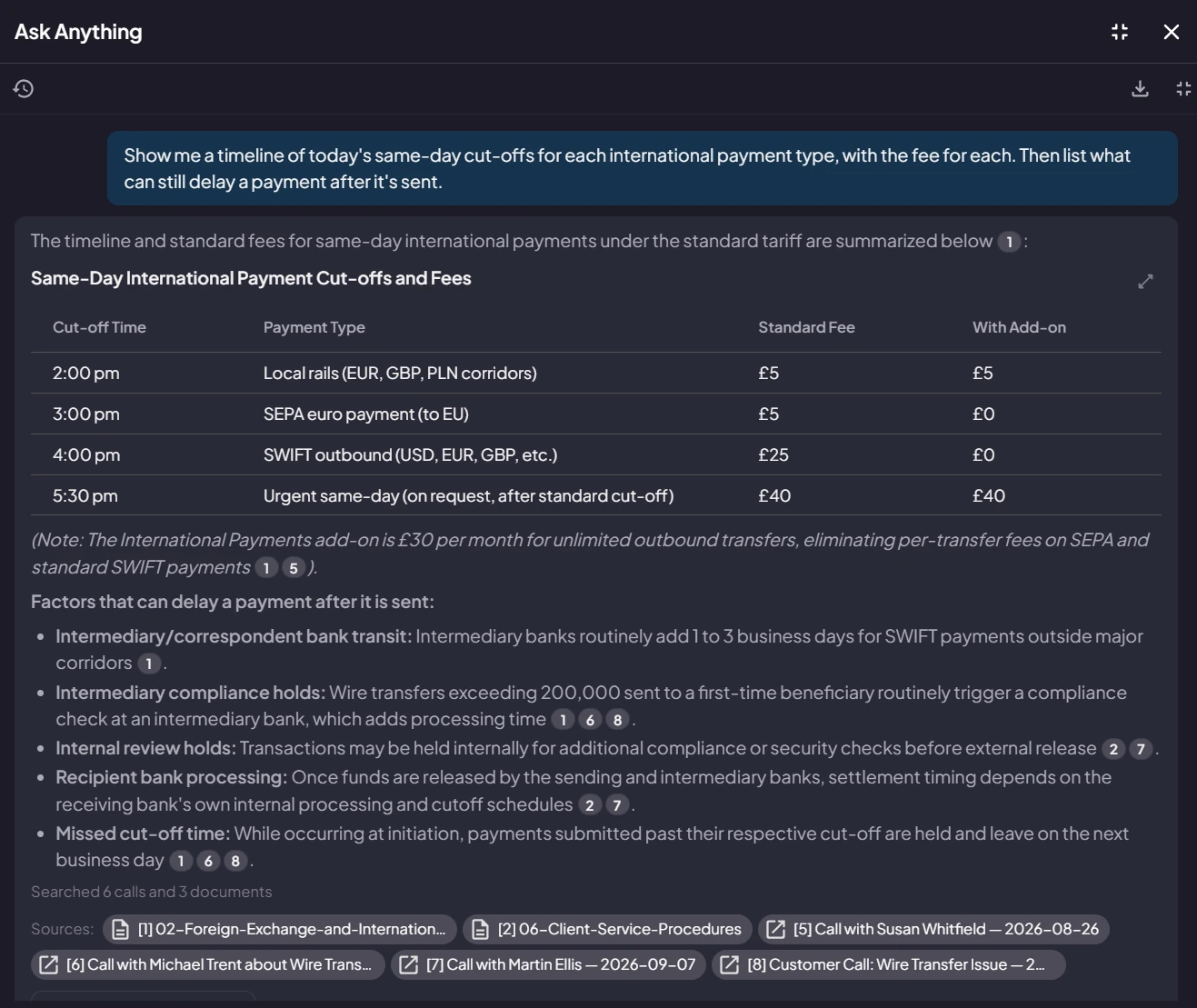
Active Insights
Ask anything. Get the answer, the report or the chart.
Ask in plain language across every call, meeting and document your company has. Every line of the answer cites where it came from — and a report or chart can be re-run next week on fresh data.
- Upload your documents once — your knowledge base answers objections on the call, and questions across the business after it
- Answers grouped, dated and prioritised, with a numbered source for every line
- Ask for an analysis and get the chart, with the evidence underneath
- Turn any answer into a filter: show me exactly the calls behind this
- Everyone gets it, over exactly the calls they are allowed to see
Ask Anything across your calls is on every paid plan. Answers from your uploaded documents are on Pro and Enterprise.
See Active Insights →Live in minutes, not months.
No IT project. Nothing to install on your phone system.
Install and sign in
Web, Windows, macOS, iOS, or Android. Your workspace opens with sample calls already summarised, with tasks and drafted follow-ups attached, so you can see the finished output before your first real call.
Work exactly as you do now
ActiveLens recognizes when a call or meeting starts. Nothing joins the call, nothing to press, no change to how you dial.
Get the work back
A summary, the decisions, and the drafted follow-ups — ready within seconds of hanging up.
One product, every device.
Your conversations follow you between the desk, the road, and the room.
And in your language
The app itself runs in English, Hebrew, Spanish, French, German, Portuguese, Chinese, Japanese and Arabic — right-to-left layouts included. Set the summary language separately from the language spoken, so a call in Hebrew can be written up in English for head office.

Built for businesses that are asked hard questions.
SOC 2 Type 2, with controls examined against the HIPAA Security Rule. Sign-in through Google, Microsoft or Apple, and configurable data-retention controls. Security was a product requirement from the start, driven by design partners in financial services and the public sector.
Built for businesses where the conversation is the work.
Different trades, same problem: the client is on the phone, in the room, or on a video call, and what gets said has to end up somewhere.
Professional services
- Accounting & bookkeeping
- Legal
- Financial advisory
- Consulting
- Architecture & engineering
Insurance & property
- Insurance agencies & brokers
- Mortgage brokers
- Real estate
- Property management
Healthcare & care
- Clinics & medical centers
- Dental practices
- Care homes & home care
- Veterinary
- Therapy & mental health
People & public services
- Recruiting & staffing
- Schools & universities
- Local government
- Social services & housing
Field & operations
- Construction & contracting
- HVAC, plumbing & electrical
- Logistics & dispatch
- Auto sales & service
Sales-led businesses
- Wholesale & distribution
- Travel & events
- Manufacturers' sales desks
- Agencies
Not on this list? If your business runs on conversations with clients, patients, candidates or citizens, it is the same problem — and ActiveLens works the same way.
Start free. Upgrade when it pays for itself.
A free plan that stays free, and paid plans from $14 per user per month, billed annually.
Start capturing every conversation.
Free trial, no credit card. Works on the phone you are already using — nothing to change, nothing to install on your phone system.
No credit card required